News
Abstract
PTF information for IBM Navigator for i
Content
You are in: IBM i Technology Updates > IBM Navigator for i > IBM Navigator for i PTFs
- The most recent PTFs are listed at the top of this table.
- The Navigator for i PTFs are shipped in the HTTP group. It is recommended that you use the latest group PTF and also keep current on related PTF groups listed here:
| IBM i 7.6 | IBM i 7.5 | IBM i 7.4 | IBM i 7.3 | |
HTTP group | SF99962 | SF99952 | SF99662 | SF99722 |
| Java PTF group | SF99965 | SF99955 | SF99665 | SF99725 |
| Database - Db2 PTF group | SF99960 | SF99950 | SF99704 | SF99703 |
| Performance Tools PTF group | SF99963 | SF99953 | SF99663 | SF99723 |
- See also the list of Installed Product requirements.
- Follow these Steps for applying PTFs
*************** TEST PTF WARNING ***************
Do not apply any new Navigator PTFs without first removing any navigator Test PTFs from your system.
If an existing Test PTF is left on when you apply any new Navigator PTFs, this could cause the existing Test PTF to be *PERM applied. While this is not typical, it may happen if new Navigator PTFs are created to be released before the Test PTF and the supersede chains are modified.
*************** TEST PTF WARNING ***************
| Approve date and link to details | IBM i 7.6 | IBM i 7.5 | IBM i 7.4 | IBM i 7.3 | Group information | Notes |
|---|---|---|---|---|---|---|
| Q4 2026 PTFs planned for December 2026 release | no future updates planned | <- HTTP group update planned following Navigator update | Build date AJS # | |||
| Q4 security 1 | SJ11740 | SJ11745 | SJ11746 | SJ11747 | build date 10/1/2026 AJS 7.2.26.266 | |
| security | SJ11832 | SJ11775 | SJ11833 | SJ11841 | ARE OS security PTF | |
| Q3 9/25/2026 | SJ11480 HTTP SF99962 - 15 | SJ11482 HTTP SF99952 - 34 | SJ11483 HTTP SF99662 - 55 | SJ11484 HTTP SF99722 - 71 | build date 9/21/2026 AJS 7.2.26.246 | |
| Q3 security 2 9/8/2026 | SJ11196 HTTP SF99962 - 14 | SJ11197 HTTP SF99952 - 33 | SJ11200 HTTP SF99662 - 54 | SJ11187 HTTP SF99722 - 70 | HTTP group update 9/9/2026 | Security PTFs build date 9/1/2026 |
| SJ11337 | SJ11336 | SJ11335 | SJ11394 | ADMIN PTFs | ||
| SJ11358 | SJ11357 | SJ11356 | SJ11355 | ias-spi PTFs | ||
| SJ11377 | SJ11376 | SJ11375 | SJ11374 | DCM | ||
| 8/20/2026 | 5733ARE SJ11185 - Security Bulletin: IBM Application Runtime Expert (ARE) for IBM i | Security fixes - will break login to the IBMARE legacy ARE (http://system:12401/are) - used for template work | Use ARE in new Navigator for console | |||
| Q3 security 1 8/11/2026 | SJ10887 | SJ10888 | SJ10890 | SJ10891 | security PTFs build date 8/7/2026 | |
| approved 7/24/2026 | SJ10627 | SJ10629 | SJ10630 | SJ10803 | Liberty update to 26.0.0.7 - LTPA | build date 7/22/2026 |
6/25/2026 | SJ10004 | SJ10016 | SJ10019 | SJ10020 | CVE Navigator PTF | build date 6/25/2026 |
| SJ09352 | SJ09340 | SJ09243 | N/A | <- Admin updates | ||
| SJ09220 | SJ09219 | SJ09218 | SJ09217 | <- Ias-spi pre-req | ||
| SJ07994 | SJ07993 | SJ07992 | SJ07991 | <- ARE core server side | ||
| approved 6/12/2026 | SJ09647 | SJ09652 | SJ09653 | N/A | Open Authentication support - phase 1 | |
| SJ09506 | SJ09788 | SJ09772 | <- Server side OAuth PTFs required | |||
| approved 5/15/2026 | SJ09188 | SJ09471 | SJ09475 | SJ09476 | CVE Navigator PTF | |
2/19/2026 | SJ08451 | SJ08452 | SJ08453 | SJ08457 | <- HTTP group | |
SJ08472 SJ08530 | SJ08535 SJ08529 | SJ08540 SJ08528 | SJ08544 SJ08527 | <- Debug service 3.0.3 PTFs <- IAS-SPI.jar | ||
SJ07431 | SJ07434 | SJ07439 | SJ07451 | |||
SJ08074
SJ08175
SJ08416 | SJ08073 SF99950
SJ08182
SJ08416 | SJ08072 SF99704
SJ08192
SJ08416 | SJ08071 SF99703
SJ08201
SJ08416 | <- IAS-SPI.jar <- Db2 PTF update may be required for some function <- Debug service 3.0.2 PTFs <- AJS server side PTF | ||
SJ06431 | SJ06353 | SJ06355 | SJ06783 | |||
SJ06921 SJ06446 SJ07173 SJ07305 | SJ06931 SJ06445 SJ07172 SJ07073 | SJ06934 SJ06444 SJ07171 SJ07072 | SJ07259 SJ06443 SJ07226 SJ07304 | <- Debug Service <- DCM <- IAS-SPI.jar <- ARE core | ||
SJ05429 | SJ05432 | SJ05438 | SJ05968 | Group availability 6/27/2025 | Approval 6/25/2025 | |
| SJ05407 | SJ05406 | SJ05405 | SJ05404 | ias-spi.jar | ||
SJ05533 | <- ADMIN update | |||||
| SJ05929 | AJS server side | |||||
| 2025 First PTF and IBM i 7.6 GA - 4/18/2025 | SJ04647 HTTP group SF99962 - 1 | SJ03406 | SJ03404 | SJ03402 | Group availability date 4/18/2025 | |
| Navigator on IBM i 7.6 requires Java 17 | ||||||
| SJ04656 - Db2 group SF99960 | Db2 for MFA SQL Service update | |||||
| SJ04356 | SJ04355 | SJ04354 | SJ04351 | <- Toolbox update JTOpen (included in HTTP group) | ||
SJ04541 SJ03541 | SJ03571 SJ03189 | SJ03570 SJ03188 | <- Db2M (if installed) required for truststore | |||
SJ03615 SJ03933 & SJ04036 | SJ03616 SJ03932 | SJ03617 SJ03931 | SJ03618 SJ03930 | <- Liberty <- ADMIN | ||
| SJ05019 - approved 4/16/2025 | AJS server side | |||||
| SJ04015 | ||||||
| Q4 PTF details | SJ02361 | SJ02360 | SJ02359 | group date 12/20/2024 | ||
| SJ03211 | SJ03210 | SJ03209 | <-- Required for IBM Navigator for i Q4 2024 PTFs | <- Toolbox update JTOpen 20 (included in HTTP group) | ||
SJ02323 | SJ02324 | SJ02325 | <-- Required for Historical Data time extension for detail data to be saved up to 425 days | |||
| SJ03189 | SJ03188 | N/A | <-- Required for Db2M compatibility for web truststore | |||
| Q3 PTF details | SJ01362 | SJ01363 | SJ01431 | |||
SJ02194 | SJ02193 | SJ02192 | <- ias-spi.jar dependency on WebAdmin function in Navigator | |||
| SJ01696 | <- AJS server side PTF | |||||
| Q2+ PTF details | SJ01164 | SJ01163 | SJ01162 | |||
| V7R2M0 SJ01051 | <- AJS back-end (server side) | |||||
| SJ01195 | ARE Core | |||||
| Q2 2024 - PTF details | SJ00116 | SJ00081 | SJ00464 | Group update approved 6/14 | Navigator PTFs Approved 6/13/2024 | |
SJ00788 | SJ00787 | <- Content Manager OnDemand (CMOD) 5770RD1 server-side PTFs | ||||
| TR 4 | TR 10 | <- TR for audit journal SQL service updates | ||||
| SJ00857 | <- ARE | |||||
SJ00272
| SJ00271 | N/A | BRMS | <- 5770-BR2 | ||
V1R1M0 SJ00055 V1R1M0 SJ00250 PSIRT PTF for heritage | <- Heritage ARE console compatibility with Navigator | |||||
| Q1 2024 - PTF details | SI85641 | SI85640 | SI85639 | Note new link location for HTTP group PTF levels. | PTFs approved 3/25. HTTP group updated 3/26. | |
| SI85816 | SI85814 | SI85815 | * Required for IBM Navigator for i Q1 2024 PTFs | <- Toolbox update JTOpen 20 (included in HTTP group) | ||
| 5770PT1 SI84407 | 5770PT1 SI85829 | Requires data conversion | <- Performance (PDI) update for JBVPDLY | |||
| 5770JS1 SI85782 | <- AJS back-end | |||||
| SI86073 | SI86075 | Required server-side PTFs | <- Content Manager OnDemand (CMOD) | |||
| SF99955 Level 8 | SF99665 Level 21 | SF99725 Level 31 | Java group update | Java security update | ||
| Q4 2023 - PTF details - | SI84809 | SI84811 | SI84814 | HTTP group update 12/15/2023 | After applying PTF and restarting server, users may need to switch to a different browser, or open an incognito or private browser to login. | |
| SI85387 | SI85388 | <- Content Manager OnDemand (CMOD) required updated server-side PTFs | ||||
| Q3+ 2023 - PTF details | SI84802 | SI84735 | SI84803 | HTTP group update 10/17/2023 | http group was delayed from 10/16, sorry for any inconvenience | |
| Q3 2023 - PTF details | SI83952 | SI83951 | SI83950 | HTTP group update will come out 10/17/2023 | ||
| Q2 2023 - PTF details | SI83094 | SI83095 | SI83096 | |||
| SI84130 | SI84129 | SI84128 | Java 17 and Java 11 runtime utilized in this group | |||
| SI83469 | AJS server side PTF included in group | |||||
| Q1 2023 - PTF details | SI82314 | SI82312 | SI82313 | |||
| Heritage Nav - removed from configuration with these PTFs | 5770SS1 V7R4M0 SI82187 | 5770SS1 V7R3M0 SI82188 | Will be in March 2023 HTTP group level update | |||
Note: The Navigator PTFs are approved 12/16. HTTP groups will be available on 12/16/2022 or later | SI81387 | SI81750 | SI81385 | <- HTTP Group - these levels will be made available AFTER 12/16/2022 | ||
| SF99955 | SF99665 | SF99725 | <- Java group update required | |||
| SI82443 | SI82444 | SI82445 | JTOpen 11.2 | Java Toolbox updates | ||
| SI82095 | <- LDAP related | |||||
| SI81898 | SI81897 | SI81896 | <- DCM related | |||
| SI82106 | SI82105 | SI82104 | <- Content Manager OnDemand (CMOD) required updated server-side PTFs | |||
PTF SI81386 | pre-req PTF SI80445 | |||||
| 3Q 2022 - PTF details | PTF SI80441 | PTF SI80442 | PTF SI80444 | <- HTTP Group - these levels will be made available AFTER 10/1/2022 <- Db2 Group | **Db2 group update needed for SQL service changes | |
| 6/24/2022 - PTF details | PTF SI79801 SI79326 | PTF SI79800 SI79306 | PTF SI79798 SI79308 | <- HTTP Group | <- New Nav PTF <- Requisite Toolbox PTFs | |
Note: It is highly recommended to clear the browser cache after applying this PTF | PTF: SI79404 | PTF: SI79104 | PTF: SI79103 | Navigator <- HTTP Group <- Db2 Group | **Db2 group update may be needed for Audit Journal support | |
| SF99652 group | Content Manager OnDemand for i | |||||
| 2/25/2022 - PTF details | PTF: SI78370 | PTF: SI78369 | Navigator <- HTTP Group | |||
| 12/24/2021 - PTF details - approved | PTF: SI77929 | PTF: SI77928 | Navigator PTF <- HTTP Group <- PT1 Group | PT1 group required for Collection Services updates | ||
| 11/20/2021 - PTF details - approved | PTF: SI77466 | PTF: SI77578 | Navigator PTF <- HTTP Group | |||
SI76804 & requisites - SI76805 - SI76796 - MF68751 (superseded by TR5 PTF) | SI76923 & requisites - SI76922 - SI76803 -MF68750 (superseded by TR11 PTF) | Required on endpoint system for iSCSI device management | ||||
| 9/24/2021 - 2H PTF details - approved 9/24/2021 | PTF: SI76981 | PTF: SI76982 | Navigator PTF <- HTTP Group <- Db2 Group | FIRST release of the new version of IBM Navigator for i | ||
Steps to apply IBM Navigator for i PTFs:
- the ADMIN1 server
- the Monitor server QNAVMNSRV
> ENDTCPSVR SERVER(*IAS) INSTANCE(ADMIN1)3. Apply or remove the PTFs (immediate mode).
4. Start the ADMIN1 job with this command:
> STRTCPSVR SERVER(*IAS) INSTANCE(ADMIN1)
5. Refresh (or reload) your browser after you apply the IBM Navigator for i PTFs. 
Note: Navigator is built with cache-busting options so that every new build requires the browser to reload resources. Navigator also turns off caching. Browsers however determine whether or not these options are respected. When a new PTF is applied, clearing the browser cache is not required as long as the browser is respecting these options. If you are not seeing the new build date (check Home > About) or see anything that is unexpected, clearing cache may be the best option to get you on your way to using the new Navigator code.
- A good time to refresh your browser is before you log in, on the login panel. Select the Reload or Refresh icon on your browser before you log in:
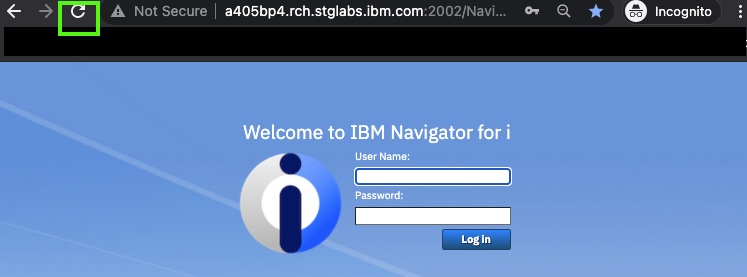
- Q4 2023 PTF had some incompatibilities that may require some users to open a new browser window or open an incognito or private browser window for the first log in after applying the PTF.
- Select Navigator GUI Log Level: FINEST (Trace)
- By default all the components will be selected. This is too much data! Do not leave All selected! Deselect the top checkbox (to unselect all), and then select the requested components: Work Management, Monitors, AS400, TLS, etc.
- Click Save
- Recreate your issue
- Save the messages.log file to send in or run the admin collector

-Dcom.ibm.navigator.logging.level=FINEST
-Dcom.ibm.navigator.logging.trace.components=AS400,TLS,SQL,Authorization,DBConn- Turn on Java Toolbox Tracing
- Set the name for the Java Toolbox Tracing File. Give it a unique name so that it does not append to an existing file. By default it is stored in /QIBM/UserData/OS/AdminInst/admin1/wlp/usr/servers/admin1/logs/
- Click Save
- Recreate your issue
- Save the javaToolboxTraceXXX.txt file to send in or run the admin collector

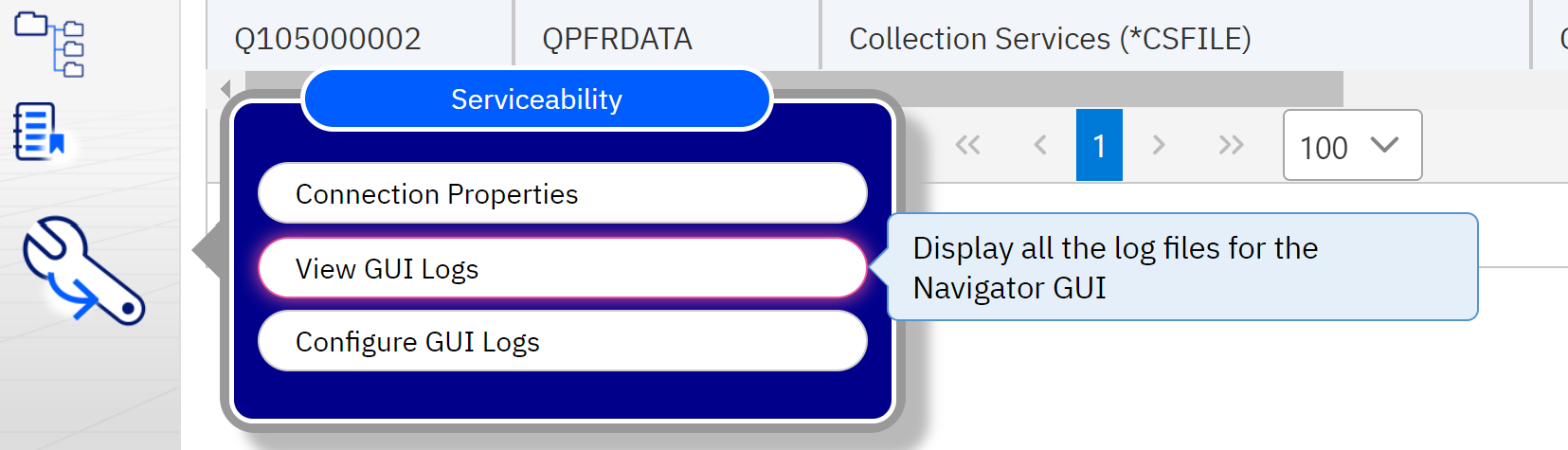
- Server-side log file: /qibm/UserData/OS/AdminInst/admin1/wlp/usr/servers/admin1/logs/messages.log
- Browser log file: Generate a browser console log file for service
- /QIBM/UserData/OS400/Navigator/config/MONITOR
- Note: the monitor log needs to be pulled from the managed/target node (not the managing/GUI node). This cannot be retrieved through the GUI when using a different GUI node from managed node.
An *ALLOBJ user profile can do this, or a *USER will need to be added to the authorization lists:
- QNAVMNTR *ALL
- QPMCCFCN *USE
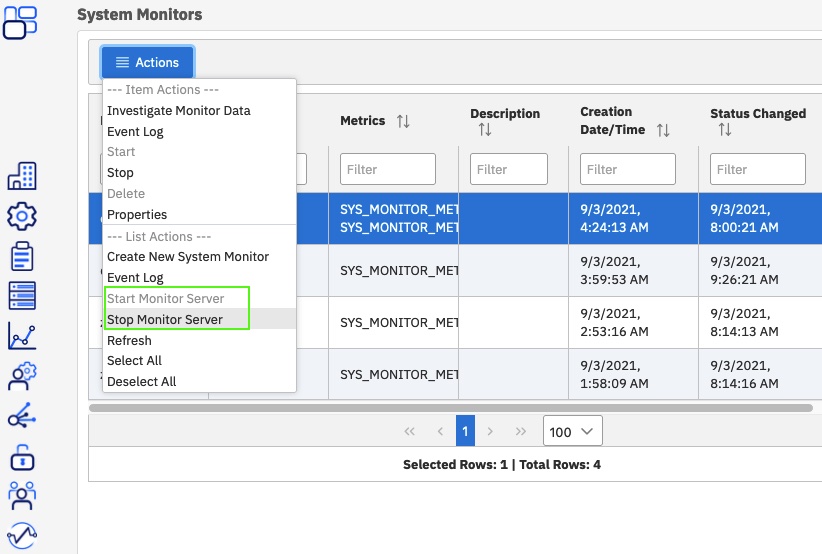
> QSYS/SBMJOB CMD(CALL PGM(QSYSDIR/QNAVMNSRV) PARM(*STOP)) CCSID(37)Note that this is changed from before the 2024Q4 PTFs
> QSYS/SBMJOB CMD(CALL PGM(QSYSDIR/QNAVMNSRV) PARM(*START)) JOB(QNAVMNSRV) JOBD(QGPL/QDFTSVR) JOBQ(QSYS/QSYSNOMAX) OUTQ(*CURRENT) USER(QWEBADMIN) CURLIB(*CRTDFT) INLLIBL(*JOBD) INLASPGRP(*JOBD) CCSID(37) CPYENVVAR(*NO)Was this topic helpful?
Document Information
Modified date:
13 October 2026
UID
ibm16486565